Saqoosha

Papervision3D で穴の中身だけレンダリングする

Blog

英国から質問 1 ついただきましたー。「年賀サイト見たんですけど FLARToolKit で穴あいたような表現ってどうやるんですか?」ですって。

そうねえ。見てるだけだとなんてことない普通の穴なんだけどいざ FLARToolKit (Papervision3D) でやろうとすると難しいっていうね。

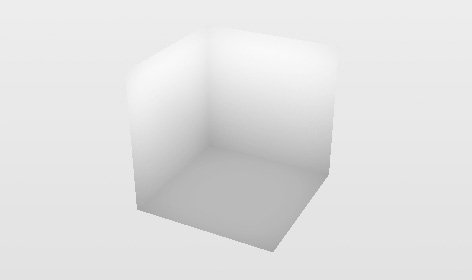
何も考えずに穴の内側だからつって法線内向きの Cube を作るとこうなる↓
2009010801-Cubichole1

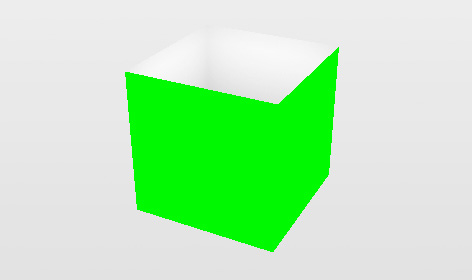
中が全部見えちゃってる。まあそらそうだ。隠すべきオブジェクトがない。どこを隠さないといけないかつーと↓の絵でいうグリーンの部分。
2009010802-Cubichole2

ここを消せば(アルファ値を 0 にすれば)見えるべき穴の中身だけが残るはず。んでどうやるかってーと↓こういう ColorMatrixFilter を使う。

new ColorMatrixFilter([
1, 0, 0, 0, 0,
0, 1, 0, 0, 0,
0, 0, 1, 0, 0,
1, -1, 1, 1, 0
])

うえの絵で緑色 (0x00ff00) を使ったのは説明用っていうわけじゃなくってこのフィルタで抜くための色なのでした。このフィルタは 0x00ff00 に近い色ほどアルファ値が低くなるっていうやつ。んでこれを適用しするとこうなる。

2009010803-Cubichole3

できたー、穴の中身だけできたー。(あー背景色もっと暗いのにしとけばよかったみにくいなでもめんどいのでそのまま。)ん、消さないといけない部分の緑色ってのは ColorMaterial(0x00ff00) を設定した Cube の側面だけのやつをちょうど穴オブジェクトと同じ位置に同じサイズで置けばいい。つーわけでそのへんひととおり組んだ動くデモソース

この方法はあれですねブルーバックで抜くやつみたいな、そんな感じね。んでブルーバックで抜くのと同じような問題がこれにもあって。デモで Stage Quality を HIGH にするとわかるんだけど、レンダリング時にアンチエイリアスをかけるとグリーンのエッジが残るのね。あとグリーン系のオブジェクトは透けるっていう。なのであの年賀サイトではまあデザイン上の理由の法がデカいんだけどグリーンは使ってない。

ってなところで寝る。英語版は明日書こう。

年賀サイトのソースコードを公開したよ

BlogFLARToolKit

あの年賀サイトのソースコードをアップしときました。お年玉あげるー。
これ→ http://09.aid-dcc.com/aid-nenga2009-source.zip

GPL はー、リクエストがあったときにソースコード出せばいいって感じなのだけど、どうやって作ってるんかつー質問がいくつかきてて何もなしに答えるのがめんどいので先に出しておこう、とか、そんな感じ。

中の README にも書いておいたですがこのアーカイブに含まれる全てのコードに GPL が適用されてるので、このソースコードを元に新しく何か作る場合、それも GPL ってことになります。ご注意を。

ああそうだ、ここだけの話、ちょっとメモリリークしてんだよねー。誰か直してくだちい。

追記(1/18 18:44):前にも問い合わせをもらってたんだけどなんかよくわからなくて放置してたヤツ。パブリッシュしても真っ白でなんにもはじまらない問題。昨日のてら子でようやく気がつきました。これ、アレです。そうでしたそうでした。ちょうどこのサイト作ってるときにエラー出まくってて、調べたのでした。家の MBP でも真っ白で意味わからなかったのだけど、メモリ増やしたら正常にパブリッシュできた。というわけで、お試しくだせい。

Categories: FLARToolKit

Comments (12)

  • funkydokta
    http://saqoosha.net/en/category/flash/
    hi,
    i have a requessst .Is it possible for you to release the source code of the application which you embeeded on the above link(in you tube in which alphabets and some other things are coming out from the marker).
    I will really appreciate your help!!!!!!!!!!!!!!!!!!!!!!!!!!!!!!!
    Please replay soon!!!!!!!!!
  • Eduardo
    Hi! Thank you for the hard work on augmented reality. Your blog is being very useful working on it and the FLARtoolkit. I have searched but i didn't find anything about using multiple markers in one single video. Do you know how we can use more than one marker by camera?

    Thanks in advance, keep the good work!!
  • Saqoosha
    > funkydokta
    I think that... the source code what you want is written in this entry.

    > Eduardo
    To use mulitple markers with FLARToolKit is a bit heavy work for Flash Player. But it is not mean that you cannot use multiple markers. FLARMultiMarkerDetector class included in FLARToolKit is for detect multiple markers. I didn't try to use multiple markers yet. Please try that class and report to me. ;-)
  • funkydokta
    Thanks for your fast reply.Actually i downloaded the code but unfortunately i dont know what to do in order to make this code running. I opened index.fla hit ctrl+enter but nothing i can see.Can you please explain me how can i use this code in order to make new words of my choice coming out of it.Also i will like to know in details, how each and every class is working.I will be grateful if you can suggesst me some way to acheive these thing.I am sorrry for this long post but "a thousand mile journey begins with a single step".
  • Saqoosha
    > funkydokta
    Sorry for late reply. I found that this problem is due to Flash compiler bug, maybe. Workaround is posted here.
    http://www.negush.net/blog/5005-unknown-error-optimizing-byte-code/
  • Nathalie
    Hi!
    I tried to opened index.fla, hit ctrl+enter too after having deleted the .aso files generated by Flash but nothing i can see. I didn't found the “Reduce file size and increase performance” in the parameters of publication in Adobe Flash CS4. Could you tell me if there are other modifications to do to make this code running?
    I have tried the FLARMULTIMarkerDetector. The tracking seems to be less robust than with the FLARsingleMarkerDetector.

    Thanks in advance!
  • Saqoosha
    Hi Nathalie,
    That problem is same as funkydokta's. so try to do workaround above.
    Multimarker is not fully tested. so I cannot give you advice currently... :-(
  • funkydokta
    Hi there,
    thanks 4 reply.Can you please suggest some tutorials in order to understand how to created AG applications in flash.Pleaseeeee.
    Its very important for my studies.
  • Nathalie
    Hi!
    I have a question about Flartoolkit. The camera seems to be linked to patterns. If I remove the pattern but keep the object, the object follows the movement of the camera but if i keep the pattern, I can rotate the camera without moving the object. Is it possible to make them independant?
    Thanks a lot in advance!
  • Javier Patiño
    Hello..thanks for all you did>>>!!!!
    I try to implement VideoStreamMateria but doesnt work the code...can you help me please

    here is the code:
    package {
    import flash.events.Event;
    import flash.media.Video;
    import flash.net.NetConnection;
    import flash.net.NetStream;
    import flash.events.MouseEvent;
    import org.papervision3d.materials.WireframeMaterial;
    import org.papervision3d.objects.parsers.Collada;
    import org.papervision3d.objects.primitives.Plane;
    import org.papervision3d.materials.VideoStreamMaterial;
    import org.papervision3d.objects.DisplayObject3D;
    import org.papervision3d.cameras.Camera3D;
    import org.papervision3d.render.LazyRenderEngine;
    import org.papervision3d.scenes.Scene3D;
    import org.papervision3d.view.Viewport3D;
    //import org.papervision3d.objects.parsers.MD2; //------------------------

    [SWF(width=640,height=480,frameRate=30,backgroundColor=0x0)]

    public class RASuite extends PV3DARApp
    {
    private var mCollada:Collada;
    //private var mD2:MD2; //---------------------------------
    private var universe:DisplayObject3D;

    private var plane:Plane;
    private var _plane:Plane;
    private var videoCristina:VideoStreamMaterial;
    private var quality:uint = 8;
    private var nc:NetConnection;
    private var video:Video;
    private var ns:NetStream;


    public function RASuite()
    {
    this.addEventListener(Event.INIT, this.onInit);
    this.init('Data/camera_para.dat', 'Data/patt.hiro');


    //plane = new Plane(videoStreamMaterial, 1600, 1200, quality, quality);
    //plane = new Plane(videoStreamMaterial, 320, 240, quality, quality);


    var customClient:Object = new Object();
    customClient.onMetaData = metaDataHandler;
    nc = new NetConnection();
    nc.connect(null);
    ns = new NetStream(nc);
    ns.client = customClient;
    ns.play("cristina.flv");

    video = new Video();
    video.width = 320;
    video.height = 240;
    video.smoothing = true;
    video.attachNetStream(ns);
    }


    protected override function onInit():void
    {
    super.onInit();
    this.removeEventListener(Event.INIT, this.onInit);


    //Plano en lineas --------------------------------------------------
    var wmat:WireframeMaterial = new WireframeMaterial(0xff0000, 1, 2);
    wmat.doubleSided = true;
    this._plane = new Plane(wmat, 80, 80);
    this._baseNode.addChild(this._plane);
    //------------------------------------------------------------------

    //Carga Objeto DAE --------------------------
    this.mCollada = new Collada("tank.dae");
    this._baseNode.addChild(this.mCollada);
    //-------------------------------------------

    //------------------------------------------------------------------
    videoCristina = new VideoStreamMaterial(video, ns);
    this.plane = new Plane(videoCristina, 80, 80, quality, quality);
    this._baseNode.addChild(this.plane);
    //------------------------------------------------------------------

    //this.mD2 = new MD2("tris.md2");
    //this.universe = new DisplayObject3D();
    //this._baseNode.addChild(this.universe);

    //llama acciones externas----------------------------------------
    this.stage.addEventListener(MouseEvent.CLICK, this._onClick);
    addEventListener( Event.ENTER_FRAME, loop3D );
    //---------------------------------------------------------------
    }

    private function metaDataHandler(infoObject:Object):void
    {
    trace('metaDataHandler',infoObject);
    }


    private function _onClick(e:MouseEvent):void
    {
    //this.mirror = !this.mirror;
    this.ns.play("cristina.flv");
    }

    private function loop3D(event:Event):void
    {

    //_plane.x += ( ( -mouseX * 5 ) - _plane.x ) / 15;
    //_plane.y += ( ( -mouseY * 5 ) - _plane.y ) / 15;

    //this.ns.play("cristina.flv");
    }
    }
    }
  • Bruno
    Hi there, great work done.. congratulations.. you did a very nice job..Im trying to learn something but when i try to compile your .fla i´ve got 121 errors like this:
    http://pastebin.com/f1243118e

    Would you please help me?

    Thank you
  • trinath
    hai its very amazing. i hav downloaded aid-nenga2009-source but i cannot find the pdf which has marker. so if u provide me. i can do the app perfectly

    thanks in advance. waiting for ur response.

Flex Builder で Wonderfl 方法

Blog

週末の Wonderfl 大会に向けて Wonderfl ネタを書くの巻。

いやー、だってさー、ブラウザ標準のエディタで AS 書くとかもー、修業やん? コードヒント出ないとやる気ダダ下がりやん? つーわけで、これまでは Flex Builder でほぼ完成させてからコピペしてたんだけど、Dr.ll_koba_ll の人が素敵な Firefox Add-on を紹介してて。ただーし、Flex Builder、というか Eclipse はコマンドラインからファイル名渡して開くってのができないという驚くべき仕様でどうしたもんかなーっていろいろいじってたらできました。以下手順。あ、Mac でのお話しね。

1. It's All Text! を Firefox にインスコ。

2. Wonderfl いって適当なのを開くか Build from Scratch

3. コードエディタ部分で右クリック → It's All Text! → Edit with new extension... → .as って入れる → Save for future use にチェック入れる → OK。(次回からは、右クリック → It's All Text! → Edit as '.as' で OK。)

4. なんかテキストエディタ開くのでファイル名覚えとく。んで閉じる。(まー、おいといてもいいけど)

5. Flex Builder で適当な名前(Wonderfl とか)で ActionScript Project を作る。

6. いま作った Project の Properties の ActionScript Bulid Path の Source Path に "/Users/ユーザー名/Library/Application Support/Firefox/Profiles/なんかランダムな文字列/itsalltext" フォルダを追加する。

7. さっきデフォルトのテキストエディタで勝手に開いたファイルが Navigator に見えるので開く。

8. 書く → 保存 → Firefox のんが更新される → Compile → ウマ-!!

次回からはプロジェクトつくらなくても↑で作ったプロジェクトをそのまま使い回せばよろし。てきとうなタイミングで itsalltext フォルダの中身は削除しとかないとどれが今編集しようとしてるのかわからなくなる。

ファイル名がクラス名と一致しないから Flex Builder で Build することはできないんだけど、まー、そうだな、Wonderfl で Runtime Error が行番号付ででるようになってれば、ほとんど必要ないな。(-debug=true で compile してくれえばいいのかしら?)

追記)FDT でもできたってよー。